<?xml version="1.0" encoding="utf-8"?><feed xmlns="http://www.w3.org/2005/Atom" ><generator uri="https://jekyllrb.com/" version="4.4.1">Jekyll</generator><link href="https://duckdb.org/feed.xml" rel="self" type="application/atom+xml" /><link href="https://duckdb.org/" rel="alternate" type="text/html" /><updated>2026-05-08T06:46:40+00:00</updated><id>https://duckdb.org/feed.xml</id><title type="html">DuckDB</title><subtitle>DuckDB is an in-process SQL database management system focused on analytical query processing. It is designed to be easy to install and easy to use. DuckDB has no external dependencies. DuckDB has bindings for C/C++, Python, R, Java, Node.js, Go and other languages.</subtitle><author><name>GitHub User</name><email>your-email@domain.com</email></author><entry><title type="html">Announcing the Program of DuckCon #7 Amsterdam</title><link href="https://duckdb.org/2026/05/08/announcing-duckcon7.html" rel="alternate" type="text/html" title="Announcing the Program of DuckCon #7 Amsterdam" /><published>2026-05-08T00:00:00+00:00</published><updated>2026-05-08T00:00:00+00:00</updated><id>https://duckdb.org/2026/05/08/announcing-duckcon7</id><content type="html" xml:base="https://duckdb.org/2026/05/08/announcing-duckcon7.html"><![CDATA[<p><img src="/images/events/thumbs/duckcon-7-amsterdam.svg" alt="DuckCon #7 Splashscreen" width="680" /></p>

<p>We are excited to announce the program of <strong>DuckCon #7 Amsterdam</strong>, DuckDB's user conference.
The event will be held on <strong>Wednesday, June 24, 2026</strong>, at the <a href="https://www.kit.nl/about-us/">Royal Tropical Institute</a>.
The program runs from <strong>15:00 to 20:00 CEST</strong>.</p>

<p>See the registration link and the full program on the <a href="/events/2026/06/24/duckcon7/">DuckCon #7 event page</a>.</p>]]></content><author><name>{&quot;twitter&quot; =&gt; &quot;none&quot;, &quot;picture&quot; =&gt; &quot;/images/blog/authors/gabor_szarnyas.png&quot;}</name></author><category term="DuckCon" /><summary type="html"><![CDATA[We are hosting DuckCon #7 in Amsterdam on June 24, 2026. Join us at the Royal Tropical Institute for talks, lightning sessions, and a borrel.]]></summary><media:thumbnail xmlns:media="http://search.yahoo.com/mrss/" url="https://duckdb.org/images/events/thumbs/duckcon-7-amsterdam.png" /><media:content medium="image" url="https://duckdb.org/images/events/thumbs/duckcon-7-amsterdam.png" xmlns:media="http://search.yahoo.com/mrss/" /></entry><entry><title type="html">Delta Grows Up: Writes, Unity Catalog and Time Travel</title><link href="https://duckdb.org/2026/05/07/delta-uc-updates.html" rel="alternate" type="text/html" title="Delta Grows Up: Writes, Unity Catalog and Time Travel" /><published>2026-05-07T00:00:00+00:00</published><updated>2026-05-07T00:00:00+00:00</updated><id>https://duckdb.org/2026/05/07/delta-uc-updates</id><content type="html" xml:base="https://duckdb.org/2026/05/07/delta-uc-updates.html"><![CDATA[<p>Welcome back! While we here at DuckDB Labs are typically of the quacking
persuasion, we’ve been busy as beavers, shoring up our Delta to prepare for
what’s next… Unity Catalog! Let’s look at how DuckDB’s
<a href="/docs/current/core_extensions/delta.html">Delta</a> and
<a href="/docs/current/core_extensions/unity_catalog.html">Unity Catalog</a>
extensions have grown up enough to shed the experimental tag, and see what
has changed since our <a href="/2025/03/21/maximizing-your-delta-scan-performance.html">last
update</a>.</p>

<h2 id="time-to-open-the-delta">Time to Open the Delta</h2>

<p>Before we jump in, let's review briefly. Delta is a foundational <a href="https://docs.delta.io/">open
table format and toolset</a> for building and managing
data lakes, related to Iceberg and other lakehouse formats. DuckDB supports
Delta tables via its <a href="/docs/current/core_extensions/delta.html">Delta
Extension</a>.</p>

<p>In that last update we highlighted performance wins, particularly file skipping
via filter pushdowns, and metadata caching with snapshot pinning. Now we build
on these, and add writes, time travel and Unity Catalog support, plus
more performance gains!</p>

<h3 id="building-up-the-delta-lake-writes">Building Up the Delta (Lake): Writes</h3>

<p>What fun are reads without writes? The big addition since we last chatted is
<code class="language-plaintext highlighter-rouge">INSERT</code> support! It works as simply as you expect. Let's assume you have a Delta
table ready to go. <code class="language-plaintext highlighter-rouge">INSERT</code> away, it's that simple:</p>

<div class="language-sql highlighter-rouge"><div class="highlight"><pre class="highlight"><code><span class="c1">-- Schema: (text VARCHAR, code BIGINT)</span>
<span class="k">ATTACH</span> <span class="s1">'./path/to/my_table'</span> <span class="k">AS</span> <span class="n">my_table</span> <span class="p">(</span><span class="k">TYPE</span> <span class="k">delta</span><span class="p">);</span>

<span class="k">INSERT</span> <span class="k">INTO</span> <span class="n">my_table</span>
<span class="k">VALUES</span> <span class="p">(</span><span class="s1">'Question 2'</span><span class="p">,</span> <span class="mi">2</span><span class="p">),</span> <span class="p">(</span><span class="s1">'The Answer'</span><span class="p">,</span> <span class="mi">42</span><span class="p">);</span>

<span class="c1">-- Bulk insert from a query</span>
<span class="k">INSERT</span> <span class="k">INTO</span> <span class="n">my_table</span>
<span class="k">FROM</span> <span class="p">(</span><span class="k">SELECT</span> <span class="n">text</span> <span class="o">||</span> <span class="s1">' (copy)'</span><span class="p">,</span> <span class="n">code</span> <span class="o">+</span> <span class="mi">100</span> <span class="k">FROM</span> <span class="n">my_table</span><span class="p">);</span>
</code></pre></div></div>

<p>Also worth calling out – multiple <code class="language-plaintext highlighter-rouge">INSERT</code>s within a <code class="language-plaintext highlighter-rouge">BEGIN</code> / <code class="language-plaintext highlighter-rouge">COMMIT</code> block are
stored as a single Delta version: one atomic commit, one new log entry. And,
as you'll see later, this works with catalogs too! <code class="language-plaintext highlighter-rouge">UPDATE</code>, <code class="language-plaintext highlighter-rouge">MERGE</code>, and <code class="language-plaintext highlighter-rouge">DELETE</code>
are not yet supported, but on our future work list.</p>

<h3 id="time-travel">Time Travel</h3>

<p>DuckDB's Delta extension now supports <a href="https://delta.io/blog/2023-02-01-delta-lake-time-travel/">time
travel</a>. Any Delta
table can be queried as of a particular version. DuckDB supports binding to a
specific <code class="language-plaintext highlighter-rouge">VERSION</code> either at <code class="language-plaintext highlighter-rouge">ATTACH</code> time, or as part of an individual query.</p>

<p>Let's assume that we have built up the above <code class="language-plaintext highlighter-rouge">my_table</code> incrementally, with
versions 0, 1, and 2 containing:</p>

<table>
  <thead>
    <tr>
      <th>Version</th>
      <th>Contents</th>
    </tr>
  </thead>
  <tbody>
    <tr>
      <td>0</td>
      <td><code class="language-plaintext highlighter-rouge">('Question 1', 1)</code></td>
    </tr>
    <tr>
      <td>1</td>
      <td>+ <code class="language-plaintext highlighter-rouge">('Question 2', 2)</code>, <code class="language-plaintext highlighter-rouge">('The Answer', 42)</code></td>
    </tr>
    <tr>
      <td>2</td>
      <td>+ <code class="language-plaintext highlighter-rouge">('Question 1 (copy)', 101)</code>, <code class="language-plaintext highlighter-rouge">('Question 2 (copy)', 102)</code>, <code class="language-plaintext highlighter-rouge">('The Answer (copy)', 142)</code></td>
    </tr>
  </tbody>
</table>

<p>You can attach normally and query arbitrary versions inline as needed. The
most flexible approach:</p>

<div class="language-sql highlighter-rouge"><div class="highlight"><pre class="highlight"><code><span class="k">ATTACH</span> <span class="s1">'./path/to/my_table'</span> <span class="k">AS</span> <span class="n">my_table</span> <span class="p">(</span><span class="k">TYPE</span> <span class="k">delta</span><span class="p">);</span>

<span class="k">SELECT</span> <span class="nf">count</span><span class="p">()</span> <span class="k">FROM</span> <span class="n">my_table</span> <span class="k">AT</span> <span class="p">(</span><span class="k">VERSION</span> <span class="o">=&gt;</span> <span class="mi">0</span><span class="p">);</span> <span class="c1">-- 1  (Question 1 only)</span>
<span class="k">SELECT</span> <span class="nf">count</span><span class="p">()</span> <span class="k">FROM</span> <span class="n">my_table</span> <span class="k">AT</span> <span class="p">(</span><span class="k">VERSION</span> <span class="o">=&gt;</span> <span class="mi">1</span><span class="p">);</span> <span class="c1">-- 3  (after 1st insert)</span>
<span class="k">SELECT</span> <span class="nf">count</span><span class="p">()</span> <span class="k">FROM</span> <span class="n">my_table</span><span class="p">;</span>                   <span class="c1">-- 6  (latest)</span>
</code></pre></div></div>

<p>Or attach, pinned to a specific version, which is useful when you want a stable
reference that never changes, regardless of future writes:</p>

<div class="language-sql highlighter-rouge"><div class="highlight"><pre class="highlight"><code><span class="c1">-- Always v1, no matter what gets written later</span>
<span class="k">ATTACH</span> <span class="s1">'./path/to/my_table'</span> <span class="k">AS</span> <span class="n">my_table_v1</span>
    <span class="p">(</span><span class="k">TYPE</span> <span class="k">delta</span><span class="p">,</span> <span class="k">VERSION</span> <span class="mi">1</span><span class="p">);</span>

<span class="k">SELECT</span> <span class="nf">count</span><span class="p">()</span> <span class="k">FROM</span> <span class="n">my_table_v1</span><span class="p">;</span>      <span class="c1">-- → 3</span>

<span class="c1">-- Locked to whatever was latest at attach time</span>
<span class="k">ATTACH</span> <span class="s1">'./path/to/my_table'</span> <span class="k">AS</span> <span class="n">my_table_pinned</span>
    <span class="p">(</span><span class="k">TYPE</span> <span class="k">delta</span><span class="p">,</span> <span class="k">PIN_SNAPSHOT</span><span class="p">);</span>

<span class="k">SELECT</span> <span class="nf">count</span><span class="p">()</span> <span class="k">FROM</span> <span class="n">my_table_pinned</span><span class="p">;</span>  <span class="c1">-- → 6</span>
</code></pre></div></div>

<h3 id="growing-up-no-longer-a-kit-">Growing Up: No Longer a Kit 🦫</h3>

<p>The DuckDB Delta extension is no longer a
<a href="https://duckduckgo.com/?q=what+is+a+baby+beaver+called">kit</a> and has grown
up quite a bit since a year ago.
As you just saw, we added writes and time travel. These features open the
door to something bigger: Unity Catalog coordination.</p>

<h2 id="unity-catalog-support-atop-the-delta">Unity Catalog Support atop the Delta</h2>

<p>Data lake systems excel at scale. As your data assets multiply,
you need a way to discover what exists, control who can access it, audit how
it's being used, and coordinate writes across multiple engines. Data catalogs
have evolved to address exactly these needs, sitting above the storage layer
to manage the metadata, governance, and transactional bookkeeping that make
large-scale data lakes effective. The OSS Unity Catalog team has a <a href="https://unitycatalog.io/blogs/what-is-a-data-catalog-and-why-do-i-need-one/">good
overview</a>
if you'd like to go deeper; the concepts apply broadly regardless of which
catalog you use.</p>

<h3 id="what-is-unity-catalog">What is Unity Catalog?</h3>

<p>Unity Catalog (UC for short) is an open standard for governing data and AI
assets, including tables, volumes, models, and functions, across engines and
clouds. It turns your data lake into a lakehouse, and gives you a single place
to discover, audit, and control access to your data, regardless of what's
reading or writing it. DuckDB's Unity Catalog extension is built upon the
<a href="https://docs.unitycatalog.io/">Unity Catalog Open API</a>. There are two main
implementations: <a href="https://unitycatalog.io/">OSS Unity Catalog</a>, which you can
self-host (and Docker-ify in minutes), and <a href="https://docs.databricks.com/aws/en/data-governance/unity-catalog/">Databricks Unity
Catalog</a>,
the managed version. Like Delta, the DuckDB Unity Catalog extension has shed
its experimental tag. Let's put both to work.</p>

<h3 id="getting-started-oss-unity-catalog">Getting Started: OSS Unity Catalog</h3>

<p>We've set up a <a href="https://github.com/benfleis/duckdb-unitycatalog-playground/">Docker image playground bundling OSS Unity Catalog and DuckDB
together</a>,
so you can follow along with easy docker build-and-run setup. Grab it
if you would like to walk through the samples or experiment on your own. (If
you'd prefer to run OSS UC directly, the official image is the upstream of our
playground.)</p>

<p>Let's start with Docker. Assuming you now have the image running, it
already executed (roughly) the following steps in the build phase to prepare
our playground:</p>

<div class="language-bash highlighter-rouge"><div class="highlight"><pre class="highlight"><code><span class="c"># Create a schema</span>
/home/unitycatalog/bin/uc schema create <span class="nt">--catalog</span> unity <span class="nt">--name</span> my_schema

<span class="c"># Create the "pets" table</span>
/home/unitycatalog/bin/uc table create <span class="se">\</span>
    <span class="nt">--full_name</span>        unity.my_schema.pets <span class="se">\</span>
    <span class="nt">--columns</span>          <span class="s2">"uuid STRING, name STRING, age INT, adopted BOOLEAN"</span> <span class="se">\</span>
    <span class="nt">--format</span>           DELTA <span class="se">\</span>
    <span class="nt">--storage_location</span> file:///home/unitycatalog/etc/data/external/unity/my_schema/tables/pets
</code></pre></div></div>

<p>After that, we can test things out from DuckDB. To see for
yourself, <code class="language-plaintext highlighter-rouge">docker exec -it duckdb-playground duckdb</code> will give you a DuckDB shell
inside the container.</p>

<p>Before doing anything meaningful we'll need to set up a DuckDB secret. In this
example the <code class="language-plaintext highlighter-rouge">TOKEN</code> value is ignored by local OSS UC server, but the field is
required. Create the secret, then you can immediately attach and read:</p>

<div class="language-sql highlighter-rouge"><div class="highlight"><pre class="highlight"><code><span class="k">LOAD</span><span class="n"> unity_catalog</span><span class="p">;</span>

<span class="k">CREATE</span> <span class="k">SECRET</span> <span class="p">(</span>
    <span class="k">TYPE</span>     <span class="k">unity_catalog</span><span class="p">,</span>
    <span class="k">TOKEN</span>    <span class="s1">'demo-ignored-token'</span><span class="p">,</span>
    <span class="k">ENDPOINT</span> <span class="s1">'http://unitycatalog:8080'</span>
<span class="p">);</span>

<span class="k">ATTACH</span> <span class="s1">'unity'</span> <span class="k">AS</span> <span class="n">my_catalog</span>
    <span class="p">(</span><span class="k">TYPE</span> <span class="k">unity_catalog</span><span class="p">,</span> <span class="k">DEFAULT_SCHEMA</span> <span class="s1">'my_schema'</span><span class="p">);</span>

<span class="k">SELECT</span> <span class="n">name</span><span class="p">,</span> <span class="n">age</span><span class="p">,</span> <span class="n">adopted</span> <span class="k">FROM</span> <span class="n">my_catalog.pets</span> <span class="k">ORDER</span> <span class="k">BY</span> <span class="n">name</span><span class="p">;</span>
<span class="c1">-- returns a single 'Seed' row</span>
</code></pre></div></div>

<p>That's it! You just queried Unity-Catalog-managed, Delta-stored pets data.</p>

<blockquote>
  <p>Tip Want to experiment with this on Databricks Unity Catalog? Setting up a
Databricks Unity Catalog is out of scope for this blog, but if you have one
ready to go, you will need these to get bootstrapped with DuckDB:</p>

  <ul>
    <li>set <code class="language-plaintext highlighter-rouge">ENDPOINT</code> to <a href="https://docs.databricks.com/aws/en/workspace/workspace-details#workspace-instance-names-urls-and-ids">your Workspace
URL</a>
(typically: https://{instance}.cloud.databricks.com/)</li>
    <li>set <code class="language-plaintext highlighter-rouge">TOKEN</code> appropriately (e.g. <a href="https://docs.databricks.com/aws/en/dev-tools/auth/pat">create a
PAT</a> with
<code class="language-plaintext highlighter-rouge">unity-catalog</code> scope); getting the correct token depends
entirely on your setup. To dive in, see <a href="https://docs.databricks.com/aws/en/data-governance/unity-catalog/access-control/">Access Control in Unity
Catalog</a>.</li>
  </ul>

  <p>With these in hand you can use DuckDB directly, or access
the extensive <a href="https://docs.databricks.com/api/workspace/introduction">UC Open
API</a> directly.</p>
</blockquote>

<p>Next, let's complete the circle and write some data into our pets table:</p>

<div class="language-sql highlighter-rouge"><div class="highlight"><pre class="highlight"><code><span class="k">INSERT</span> <span class="k">INTO</span> <span class="n">my_catalog.pets</span>
    <span class="p">(</span><span class="n">uuid</span><span class="p">,</span> <span class="n">name</span><span class="p">,</span> <span class="n">age</span><span class="p">,</span> <span class="n">adopted</span><span class="p">)</span>
<span class="k">SELECT</span>
    <span class="nf">gen_random_uuid</span><span class="p">()::</span><span class="nb">VARCHAR</span><span class="p">,</span>
    <span class="p">[</span><span class="s1">'Luna'</span><span class="p">,</span> <span class="s1">'Milo'</span><span class="p">,</span> <span class="s1">'Bella'</span><span class="p">,</span> <span class="s1">'Charlie'</span><span class="p">,</span> <span class="s1">'Max'</span><span class="p">,</span> <span class="s1">'Lucy'</span><span class="p">,</span> <span class="s1">'Cooper'</span><span class="p">,</span>
     <span class="s1">'Daisy'</span><span class="p">,</span> <span class="s1">'Buddy'</span><span class="p">,</span> <span class="s1">'Lily'</span><span class="p">,</span> <span class="s1">'Rocky'</span><span class="p">,</span> <span class="s1">'Molly'</span><span class="p">,</span> <span class="s1">'Bear'</span><span class="p">,</span> <span class="s1">'Lola'</span><span class="p">,</span>
     <span class="s1">'Duke'</span><span class="p">,</span> <span class="s1">'Sadie'</span><span class="p">,</span> <span class="s1">'Tucker'</span><span class="p">,</span> <span class="s1">'Zoe'</span><span class="p">,</span> <span class="s1">'Oliver'</span><span class="p">,</span> <span class="s1">'Stella'</span>
    <span class="p">][</span><span class="mi">1</span> <span class="o">+</span> <span class="p">(</span><span class="nf">random</span><span class="p">()</span> <span class="o">*</span> <span class="mi">19</span><span class="p">)::</span><span class="nb">INT</span><span class="p">],</span>
    <span class="p">(</span><span class="mi">1</span> <span class="o">+</span> <span class="p">(</span><span class="nf">random</span><span class="p">()</span> <span class="o">*</span> <span class="mi">14</span><span class="p">)::</span><span class="nb">INT</span><span class="p">)::</span><span class="nb">INT</span><span class="p">,</span>
    <span class="nf">random</span><span class="p">()</span> <span class="o">&gt;</span> <span class="mf">0.5</span>
<span class="k">FROM</span> <span class="nf">range</span><span class="p">(</span><span class="mi">10</span><span class="p">);</span>

<span class="k">SELECT</span> <span class="nf">count</span><span class="p">()</span> <span class="k">FROM</span> <span class="n">my_catalog.pets</span><span class="p">;</span>
</code></pre></div></div>

<p>You can also easily find and see the created files; check the local <code class="language-plaintext highlighter-rouge">data</code>
directory (also bind-mounted in Docker), and you should find both pre-existing
files, and a new Parquet file containing the inserted rows. In my case it looks
like this:</p>

<div class="language-batch highlighter-rouge"><div class="highlight"><pre class="highlight"><code><span class="nb">tree </span>data
</code></pre></div></div>

<div class="language-text highlighter-rouge"><div class="highlight"><pre class="highlight"><code>data
└── external
    └── unity
        └── my_schema
            └── tables
                └── pets
                    ├── _delta_log
                    │   ├── 00000000000000000000.json
                    │   ├── 00000000000000000001.json
                    │   └── 00000000000000000002.json
                    ├── duckdb-19cb47ae-9f35-4126-b67d-c94fcade68cc.parquet
                    └── duckdb-e3bb0336-f16a-4d21-9495-0fbf55c6cba8.parquet

7 directories, 5 files
</code></pre></div></div>

<h3 id="catalog-managed-tables">Catalog Managed Tables</h3>

<p>With the basics out of the way, we can talk about <a href="https://docs.databricks.com/aws/en/tables/managed">Catalog Managed Tables
(CMT)</a>. This is available
today in both <a href="https://www.unitycatalog.io/">OSS</a> and
<a href="https://docs.databricks.com/aws/en/data-governance/unity-catalog/">Databricks</a>
Unity Catalog.</p>

<p>The big feature in CMT is coordinated concurrent writes. Without CMT,
DuckDB writes go directly to the Delta log. While modern storage backends
prevent outright lost writes, UC is left out of the loop entirely. Its
metadata, audit trail, and statistics fall out of sync with the actual table
state, and other engines querying through UC may see a stale view.</p>

<p>CMT fixes this: every write is staged and registered through UC before it
becomes visible. UC acts as the commit arbiter, preserving first writer
commits, and sending a conflict error to later writers. This matters
wherever multiple writers are appending simultaneously, e.g., parallel ETL
pipelines, partitioned bulk loads, and concurrent analytical inserts. Each
writer works independently; UC ensures exactly one commit lands per version and
keeps its own catalog in sync with every one of them.</p>

<p>Consistent reads and audit history are already inherent to Delta and UC
respectively. CMT doesn't add functionality, it just ensures UC stays in sync with
every commit. And CMT coordinates commits per table; there is no cross-table
atomicity. If you write to two tables in the same <code class="language-plaintext highlighter-rouge">BEGIN</code> / <code class="language-plaintext highlighter-rouge">COMMIT</code> block,
each table commits independently.</p>

<p>To opt a table into CMT, set the <code class="language-plaintext highlighter-rouge">delta.feature.catalogManaged</code> table property
at creation time. This is done via Spark or the UC CLI, as DuckDB's Unity Catalog
extension does not yet support <code class="language-plaintext highlighter-rouge">CREATE TABLE</code> DDL:</p>

<div class="language-sql highlighter-rouge"><div class="highlight"><pre class="highlight"><code><span class="c1">-- Via Spark</span>
<span class="k">CREATE</span> <span class="k">TABLE</span> <span class="n">my_catalog.my_schema.concurrent_tbl</span> <span class="p">(</span>
    <span class="n">uuid</span>    <span class="nb">STRING</span>  <span class="k">NOT</span> <span class="nb">NULL</span><span class="p">,</span>
    <span class="n">name</span>    <span class="nb">STRING</span>  <span class="k">NOT</span> <span class="nb">NULL</span><span class="p">,</span>
    <span class="n">age</span>     <span class="nb">INT</span>     <span class="k">NOT</span> <span class="nb">NULL</span><span class="p">,</span>
    <span class="n">adopted</span> <span class="nb">BOOLEAN</span> <span class="k">NOT</span> <span class="nb">NULL</span>
<span class="p">)</span>
<span class="k">TBLPROPERTIES</span> <span class="p">(</span><span class="s1">'delta.feature.catalogManaged'</span> <span class="o">=</span> <span class="s1">'supported'</span><span class="p">);</span>
</code></pre></div></div>

<p>Once CMT-enabled, DuckDB writes go through UC's commit staging automatically —
the <code class="language-plaintext highlighter-rouge">INSERT</code> syntax is unchanged:</p>

<div class="language-sql highlighter-rouge"><div class="highlight"><pre class="highlight"><code><span class="k">INSERT</span> <span class="k">INTO</span> <span class="n">my_catalog.my_schema.concurrent_tbl</span>
    <span class="p">(</span><span class="n">uuid</span><span class="p">,</span> <span class="n">name</span><span class="p">,</span> <span class="n">age</span><span class="p">,</span> <span class="n">adopted</span><span class="p">)</span>
<span class="k">VALUES</span> <span class="p">(</span><span class="nf">gen_random_uuid</span><span class="p">()::</span><span class="nb">VARCHAR</span><span class="p">,</span> <span class="s1">'Luna'</span><span class="p">,</span> <span class="mi">3</span><span class="p">,</span> <span class="k">true</span><span class="p">);</span>
</code></pre></div></div>

<p>Now each DuckDB writer stages its commit to a <code class="language-plaintext highlighter-rouge">_staged_commits/</code> directory and
registers it with UC before that data becomes visible. UC arbitrates: exactly
one writer wins each version in a race, the others get a conflict error and can
retry. Next, let's look at how UC handles the race.</p>

<h2 id="deeper-dive">Deeper Dive</h2>

<h3 id="racing-commits">Racing Commits</h3>

<p>To see how CMT arbitrates, we launched 20 concurrent DuckDB
writers, 8 at a time, all inserting into the same CMT table:</p>

<div class="language-batch highlighter-rouge"><div class="highlight"><pre class="highlight"><code><span class="nb">seq </span>1 20 | xargs <span class="nt">-P</span> 8 <span class="nt">-I</span><span class="o">{}</span> scripts/unity/05-cmc/write-single <span class="o">{}</span>
</code></pre></div></div>

<div class="language-text highlighter-rouge"><div class="highlight"><pre class="highlight"><code>[worker 6] OK - inserted 5 rows
[worker 5] CONFLICT - another writer won this version, retry needed
[worker 2] CONFLICT - another writer won this version, retry needed
[worker 8] CONFLICT - another writer won this version, retry needed
[worker 7] CONFLICT - another writer won this version, retry needed
[worker 3] CONFLICT - another writer won this version, retry needed
[worker 1] OK - inserted 5 rows
[worker 4] CONFLICT - another writer won this version, retry needed
[worker 16] OK - inserted 5 rows
[worker 13] CONFLICT - another writer won this version, retry needed
[worker 15] CONFLICT - another writer won this version, retry needed
[worker 11] CONFLICT - another writer won this version, retry needed
[worker 14] CONFLICT - another writer won this version, retry needed
[worker 12] OK - inserted 5 rows
[worker 9] CONFLICT - another writer won this version, retry needed
[worker 10] CONFLICT - another writer won this version, retry needed
[worker 17] CONFLICT - another writer won this version, retry needed
[worker 20] CONFLICT - another writer won this version, retry needed
[worker 18] OK - inserted 5 rows
[worker 19] CONFLICT - another writer won this version, retry needed
</code></pre></div></div>

<p>Here we see 5 successful writes, and 15 signaled conflicts. Let's confirm in
the data:</p>

<div class="language-sql highlighter-rouge"><div class="highlight"><pre class="highlight"><code><span class="k">SELECT</span> <span class="nf">count</span><span class="p">()</span> <span class="k">AS</span> <span class="n">total_rows</span> <span class="k">FROM</span> <span class="n">my_catalog.my_schema.concurrent_tbl</span><span class="p">;</span>
</code></pre></div></div>

<div class="language-text highlighter-rouge"><div class="highlight"><pre class="highlight"><code>┌────────────┐
│ total_rows │
│   int64    │
├────────────┤
│         35 │
└────────────┘
</code></pre></div></div>

<p>10 seeded rows + (5 writes × 5 rows each) = 35 total rows. (In a real workload,
you would retry the conflicted writes and land all 20 inserts.) Catalog Managed
Table commits gave us clear signal and semantics during highly concurrent
writes, as promised.</p>

<h3 id="travel-in-time-faster">Travel in Time, Faster</h3>

<p>DuckDB's Delta snapshot loading is getting a speed boost: snapshots
will load incrementally when possible, making time travel across nearby
versions significantly faster. Consider a table where some initial queries are
made against version 16:</p>

<div class="language-sql highlighter-rouge"><div class="highlight"><pre class="highlight"><code><span class="k">ATTACH</span> <span class="s1">'./path/to/table'</span> <span class="k">AS</span> <span class="n">t</span> <span class="p">(</span><span class="k">TYPE</span> <span class="k">delta</span><span class="p">,</span> <span class="k">VERSION</span> <span class="mi">16</span><span class="p">);</span>
<span class="k">SELECT</span> <span class="nf">count</span><span class="p">()</span> <span class="k">FROM</span> <span class="n">t</span><span class="p">;</span>  <span class="c1">-- → 17</span>
</code></pre></div></div>

<p>And now some work needs to be done against version 20. If we peek under the
hood (warning: sneaky code follows), we'll see that none of the previously
loaded Delta log metadata files were re-loaded:</p>

<div class="language-sql highlighter-rouge"><div class="highlight"><pre class="highlight"><code><span class="k">SET</span> <span class="py">enable_logging</span> <span class="o">=</span> <span class="k">true</span><span class="p">;</span>
<span class="k">SET</span> <span class="n">delta_kernel_logging</span> <span class="o">=</span> <span class="k">true</span><span class="p">;</span>
<span class="k">CALL</span> <span class="nf">enable_logging</span><span class="p">(</span><span class="s1">'DeltaKernel'</span><span class="p">,</span> <span class="n">level</span> <span class="o">=</span> <span class="s1">'trace'</span><span class="p">);</span>

<span class="k">ATTACH</span> <span class="s1">'./path/to/table'</span> <span class="k">AS</span> <span class="n">t</span> <span class="p">(</span><span class="k">TYPE</span> <span class="k">delta</span><span class="p">,</span> <span class="k">VERSION</span> <span class="mi">20</span><span class="p">);</span>
<span class="k">SELECT</span> <span class="nf">count</span><span class="p">()</span> <span class="k">FROM</span> <span class="n">t</span><span class="p">;</span>  <span class="c1">-- → 21</span>

<span class="c1">-- Delta kernel logs 'Provisionally selecting ... &lt;version&gt;.json'</span>
<span class="c1">-- whenever it reads a log file from scratch. We search for any such</span>
<span class="c1">-- message referencing a zero-padded log filename; zero matches</span>
<span class="c1">-- means the cached v16 snapshot was reused rather than rebuilt.</span>
<span class="k">SELECT</span> <span class="nf">count</span><span class="p">()</span> <span class="k">FROM</span> <span class="n">duckdb_logs</span>
<span class="k">WHERE</span> <span class="n">type</span> <span class="o">=</span> <span class="s1">'DeltaKernel'</span>
  <span class="k">AND</span> <span class="n">message</span> <span class="k">LIKE</span> <span class="s1">'%00000000000000000%.json%'</span><span class="p">;</span>
<span class="c1">-- → 0</span>
</code></pre></div></div>

<p>In Delta lakes with thousands or millions of snapshots, incremental loading
provides a big win when working across multiple versions.</p>

<blockquote>
  <p>At time of writing, incremental snapshot loading is supported in nightly builds.
You can install it using:</p>

  <div class="language-sql highlighter-rouge"><div class="highlight"><pre class="highlight"><code><span class="k">FORCE INSTALL</span><span class="n"> delta</span> <span class="k">FROM</span> <span class="n">core_nightly</span><span class="p">;</span>
</code></pre></div>  </div>

  <p>Please be aware that nightly builds are not intended for production use.
The implementation will be included in the next stable release,
<a href="/release_calendar.html">v1.5.3</a>.</p>
</blockquote>

<h2 id="conclusions">Conclusions</h2>

<p>A year ago, DuckDB could read Delta tables. Today it can insert data into them,
travel through their history, and query and write through a governed catalog —
without the experimental caveat on any of it. The combination of Delta for open
storage, Unity Catalog for governance and coordination, and DuckDB for fast
analytical queries is a stack you can build on.</p>

<p>There's more to come: DDL support to create and manage tables directly,
delete/update/merge support, and multi-table atomicity for writes that span
more than one table. In the meantime, the playground image linked above has
everything you need to kick the tires. As always, feedback and bug reports
are welcome on <a href="https://github.com/duckdb/duckdb-delta">GitHub</a>.</p>]]></content><author><name>Ben Fleis</name></author><category term="extensions" /><summary type="html"><![CDATA[DuckDB's Delta and Unity Catalog extensions shed their experimental tags — now with writes, Unity Catalog and time travel support.]]></summary><media:thumbnail xmlns:media="http://search.yahoo.com/mrss/" url="https://duckdb.org/images/blog/thumbs/delta-uc-updates.jpg" /><media:content medium="image" url="https://duckdb.org/images/blog/thumbs/delta-uc-updates.jpg" xmlns:media="http://search.yahoo.com/mrss/" /></entry><entry><title type="html">The DuckLake Spec Is so Simple, Even a Clanker Can Build One for Dataframes</title><link href="https://duckdb.org/2026/05/04/ducklake-dataframe.html" rel="alternate" type="text/html" title="The DuckLake Spec Is so Simple, Even a Clanker Can Build One for Dataframes" /><published>2026-05-04T00:00:00+00:00</published><updated>2026-05-04T00:00:00+00:00</updated><id>https://duckdb.org/2026/05/04/ducklake-dataframe</id><content type="html" xml:base="https://duckdb.org/2026/05/04/ducklake-dataframe.html"><![CDATA[]]></content><author><name>Pedro Holanda, Dr. Peter van Holland</name></author><category term="extensions" /><summary type="html"><![CDATA[We are showcasing the simplicity of DuckLake's v1.0 specification by developing a dataframe reader/writer with AI.]]></summary><media:thumbnail xmlns:media="http://search.yahoo.com/mrss/" url="https://duckdb.org/images/blog/thumbs/ducklake-dataframe.jpg" /><media:content medium="image" url="https://duckdb.org/images/blog/thumbs/ducklake-dataframe.jpg" xmlns:media="http://search.yahoo.com/mrss/" /></entry><entry><title type="html">Announcing DuckDB 1.5.2</title><link href="https://duckdb.org/2026/04/13/announcing-duckdb-152.html" rel="alternate" type="text/html" title="Announcing DuckDB 1.5.2" /><published>2026-04-13T00:00:00+00:00</published><updated>2026-04-13T00:00:00+00:00</updated><id>https://duckdb.org/2026/04/13/announcing-duckdb-152</id><content type="html" xml:base="https://duckdb.org/2026/04/13/announcing-duckdb-152.html"><![CDATA[<p>In this blog post, we highlight a few important fixes in DuckDB v1.5.2, the second patch release in <a href="/2026/03/09/announcing-duckdb-150.html">DuckDB's v1.5 line</a>.
You can find the complete <a href="https://github.com/duckdb/duckdb/releases/tag/v1.5.2">release notes on GitHub</a>.</p>

<p>To install the new version, please visit the <a href="/install/">installation page</a>.</p>

<h2 id="data-lake-and-lakehouse-formats">Data Lake and Lakehouse Formats</h2>

<h3 id="ducklake">DuckLake</h3>

<p>We are proud to release a stable, production-ready lakehouse specification and its reference implementation in DuckDB.</p>

<p>We published a <a href="https://ducklake.select/2026/04/13/ducklake-10/">detailed blog post on the DuckLake site</a> but here's a quick summary: DuckLake v1.0 ships dozens of bugfixes and guarantees backward-compatibility. Additionally, it has a number of cool features: <a href="https://ducklake.select/2026/04/02/data-inlining-in-ducklake/">data inlining</a>, sorted tables, bucket partitioning, and deletion buffers as Iceberg-compatible Puffin files. More on this in the <a href="https://ducklake.select/2026/04/13/ducklake-10/">announcement blog post</a>.</p>

<h3 id="iceberg">Iceberg</h3>

<p>The <a href="/docs/current/core_extensions/iceberg/overview.html">Iceberg extension</a> ships a number of new features. It now supports the following:</p>

<ul>
  <li><code class="language-plaintext highlighter-rouge">GEOMETRY</code> type</li>
  <li><code class="language-plaintext highlighter-rouge">ALTER TABLE</code> statement</li>
  <li>Updates and deletes from <a href="https://iceberg.apache.org/docs/latest/partitioning/">partitioned tables</a></li>
  <li>Truncate and bucket partitions</li>
</ul>

<p>Last week, DuckDB Labs engineer Tom Ebergen gave a talk at the <a href="https://www.icebergsummit.org/">Iceberg Summit</a> titled <a href="/library/building-duckdb-iceberg-exploring-the-iceberg-ecosystem/">“Building DuckDB-Iceberg: Exploring the Iceberg Ecosystem”</a>, where he shared his experiences with Iceberg.</p>

<h2 id="preliminary-jepsen-test-results">Preliminary Jepsen Test Results</h2>

<p>To make DuckDB as robust as possible, we started a collaboration with <a href="https://jepsen.io/">Jepsen</a>. The preliminary test suite is available at <a href="https://github.com/duckdb/duckdb-jepsen">https://github.com/duckdb/duckdb-jepsen</a>.</p>

<p>The test suite has uncovered a bug that was triggered by <code class="language-plaintext highlighter-rouge">INSERT INTO</code> statements that perform conflict resolution on a primary key, and already <a href="https://github.com/duckdb/duckdb/pull/21489">shipped a fix</a> in this release.</p>

<h2 id="new-online-shell">New Online Shell</h2>

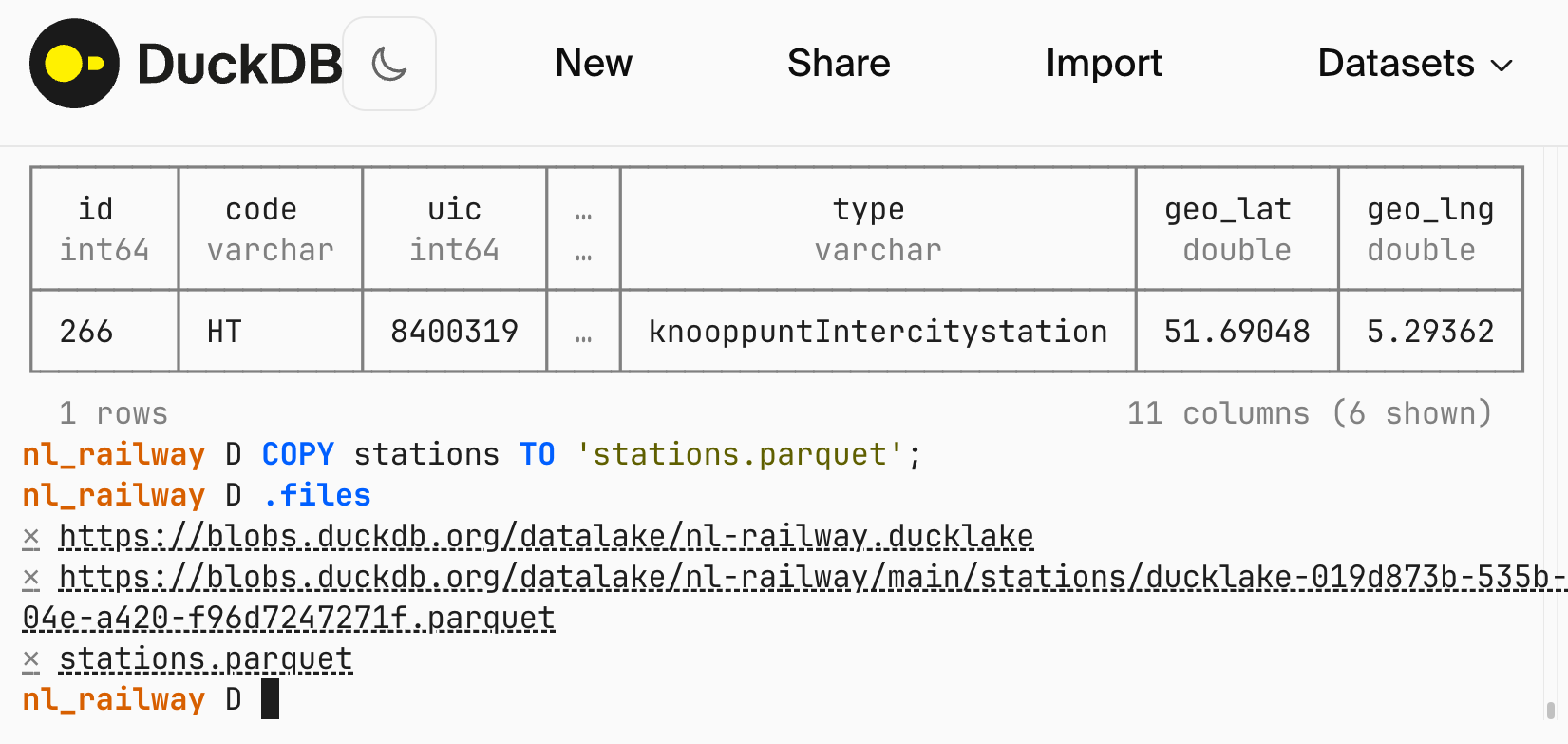
<p>The online <a href="/docs/current/clients/wasm/overview.html">WebAssembly</a> shell at <a href="https://shell.duckdb.org/"><code class="language-plaintext highlighter-rouge">shell.duckdb.org</code></a> received a complete overhaul.
A highlight of the new shell is the ability to store and list files using the <code class="language-plaintext highlighter-rouge">.files</code> dot command and its variants.</p>

<p>Using the file storage feature, you can turn your browser session into workbench: you can drag-and-drop files from your local file system to upload them, create new ones using DuckDB's <a href="/docs/current/sql/statements/copy.html#copy--to"><code class="language-plaintext highlighter-rouge">COPY ... TO</code> statement</a> and download the results. For more information on this feature, use the <code class="language-plaintext highlighter-rouge">.help</code> command.</p>

<p><img src="/images/blog/online-shell-example.png" alt="Example use of the new online shell at shell.duckdb.org" width="800" /></p>

<p>The new shell comes with a few built-in datasets: you're welcome to try them out and experiment.
Your old links to <code class="language-plaintext highlighter-rouge">shell.duckdb.org</code> should still work but if you experience any problems, please submit an issue in the <a href="https://github.com/duckdb/duckdb-wasm"><code class="language-plaintext highlighter-rouge">duckdb-web</code> repository</a>.</p>

<h2 id="benchmarks">Benchmarks</h2>

<p>We benchmarked DuckDB using the Linux v7 kernel on an <a href="https://instances.vantage.sh/aws/ec2/r8gd.8xlarge?currency=USD">r8gd.8xlarge</a> instance with 32 vCPUs, 256 GiB RAM, and an NVMe SSD.
We first ran the scale factor 300 test on Ubuntu 24.04 LTS, then upgraded to Ubuntu 26.04 beta.
We noticed that the composite TPC-H score shows a <strong>~10% improvement</strong>, jumping from 778,041 to 854,676 when measured with TPC-H's QphH@Score metric.</p>

<h2 id="coming-up">Coming Up</h2>

<p>This quarter, we have quite a few exciting events lined up.</p>

<p><strong>DuckCon #7.</strong> On June 24, we'll host our next user conference, <a href="/events/2026/06/24/duckcon7/">DuckCon #7</a>, in Amsterdam's beautiful <a href="https://www.kit.nl/about-us/">Royal Tropical Institute</a>.</p>

<p><strong>AI Council Talk.</strong> On May 12, DuckDB co-creator Hannes Mühleisen will give a talk at AI Council 2026 titled <a href="/library/super-secret-next-big-thing-for-duckdb/">“Super-Secret Next Big Thing for DuckDB”</a>. Well, at this point, we cannot tell you more than he will present the super-secret next big thing for DuckDB. But, if you cannot make it, don't worry: we'll publish the presentation afterwards.</p>

<p><strong>Ubuntu Summit Talk.</strong> We already talked about performance on Ubuntu. In late May, Gábor Szárnyas of DuckDB Labs will give a talk titled <a href="/library/duckdb-not-quack-science/">“DuckDB: Not Quack Science”</a> at the <a href="https://ubuntu.com/summit">Ubuntu Summit</a>.</p>

<h2 id="conclusion">Conclusion</h2>

<p>This post is a short summary of the changes in v1.5.2. As usual, you can find the <a href="https://github.com/duckdb/duckdb/releases/tag/v1.5.2">full release notes on GitHub</a>.</p>]]></content><author><name>The DuckDB team</name></author><category term="release" /><summary type="html"><![CDATA[We are releasing DuckDB version v1.5.2, a patch release with bugfixes and performance improvements, and support for the DuckLake v1.0 lakehouse format.]]></summary><media:thumbnail xmlns:media="http://search.yahoo.com/mrss/" url="https://duckdb.org/images/blog/thumbs/duckdb-release-1-5-2.png" /><media:content medium="image" url="https://duckdb.org/images/blog/thumbs/duckdb-release-1-5-2.png" xmlns:media="http://search.yahoo.com/mrss/" /></entry><entry><title type="html">DuckLake v1.0: The Lakehouse Format Built on SQL Reaches Production-Readiness</title><link href="https://duckdb.org/2026/04/13/ducklake-10.html" rel="alternate" type="text/html" title="DuckLake v1.0: The Lakehouse Format Built on SQL Reaches Production-Readiness" /><published>2026-04-13T00:00:00+00:00</published><updated>2026-04-13T00:00:00+00:00</updated><id>https://duckdb.org/2026/04/13/ducklake-10</id><content type="html" xml:base="https://duckdb.org/2026/04/13/ducklake-10.html"><![CDATA[]]></content><author><name>The DuckDB team</name></author><category term="extensions" /><summary type="html"><![CDATA[We released the DuckLake v1.0 standard!]]></summary><media:thumbnail xmlns:media="http://search.yahoo.com/mrss/" url="https://duckdb.org/images/blog/thumbs/ducklake-1-0.png" /><media:content medium="image" url="https://duckdb.org/images/blog/thumbs/ducklake-1-0.png" xmlns:media="http://search.yahoo.com/mrss/" /></entry><entry><title type="html">Data Inlining in DuckLake: Unlocking Streaming for Data Lakes</title><link href="https://duckdb.org/2026/04/02/data-inlining-in-ducklake.html" rel="alternate" type="text/html" title="Data Inlining in DuckLake: Unlocking Streaming for Data Lakes" /><published>2026-04-02T00:00:00+00:00</published><updated>2026-04-02T00:00:00+00:00</updated><id>https://duckdb.org/2026/04/02/data-inlining-in-ducklake</id><content type="html" xml:base="https://duckdb.org/2026/04/02/data-inlining-in-ducklake.html"><![CDATA[]]></content><author><name>{&quot;twitter&quot; =&gt; &quot;holanda_pe&quot;, &quot;picture&quot; =&gt; &quot;/images/blog/authors/pedro_holanda.jpg&quot;}</name></author><category term="deep dive" /><summary type="html"><![CDATA[DuckLake’s data inlining stores small updates directly in the catalog, eliminating the “small files problem” and making continuous streaming into data lakes practical. Our benchmark shows 926× faster queries and 105× faster ingestion when compared to Iceberg.]]></summary><media:thumbnail xmlns:media="http://search.yahoo.com/mrss/" url="https://duckdb.org/images/blog/thumbs/ducklake-inlining.png" /><media:content medium="image" url="https://duckdb.org/images/blog/thumbs/ducklake-inlining.png" xmlns:media="http://search.yahoo.com/mrss/" /></entry><entry><title type="html">DuckDB Now Speaks Dutch!</title><link href="https://duckdb.org/2026/04/01/duckdb-now-speaks-dutch.html" rel="alternate" type="text/html" title="DuckDB Now Speaks Dutch!" /><published>2026-04-01T00:00:00+00:00</published><updated>2026-04-01T00:00:00+00:00</updated><id>https://duckdb.org/2026/04/01/duckdb-now-speaks-dutch</id><content type="html" xml:base="https://duckdb.org/2026/04/01/duckdb-now-speaks-dutch.html"><![CDATA[<p>Historically speaking, SQL queries have always been formulated in English. The initial name of the language was even Structured <strong>English</strong> Query Language (SEQUEL), before it became SQL. Now, what if the Dutch hadn't traded away New Amsterdam (present-day New York)? Would we all have been writing SQL in Dutch instead?</p>

<p>Well, wonder no longer. Today we're releasing <a href="/community_extensions/extensions/eenddb.html"><strong>EendDB</strong></a>: a DuckDB extension that brings you the <strong>Gestructureerde Zoektaal,</strong> or GZT for short.</p>

<p>Want joins? We've got <code class="language-plaintext highlighter-rouge">SAMENVOEGEN</code>. Aggregates? <code class="language-plaintext highlighter-rouge">GROEP PER</code>. Window functions? Those work too — though you'll have to look up the Dutch keywords in the repository yourself.</p>

<p>You can try it out right now in <a href="/2026/03/23/announcing-duckdb-151.html">DuckDB v1.5.1</a>:</p>

<div class="language-sql highlighter-rouge"><div class="highlight"><pre class="highlight"><code><span class="k">INSTALL</span><span class="n"> eenddb</span> <span class="k">FROM</span> <span class="n">community</span><span class="p">;</span>
<span class="k">LOAD</span><span class="n"> eenddb</span><span class="p">;</span>
<span class="k">CALL</span> <span class="nf">enable_dutch_parser</span><span class="p">();</span>

<span class="k">MAAK</span> <span class="k">TABEL</span> <span class="n">eend</span> <span class="p">(</span>
    <span class="n">id</span>        <span class="nb">GEHEEL_GETAL</span><span class="p">,</span>
    <span class="n">naam</span>      <span class="nb">TEKST</span><span class="p">,</span>
    <span class="n">leeftijd</span>  <span class="nb">GEHEEL_GETAL</span><span class="p">,</span>
    <span class="n">gewicht</span>   <span class="nb">KOMMAGETAL</span><span class="p">,</span>
    <span class="n">soort</span>     <span class="nb">TEKST</span>
<span class="p">);</span>

<span class="k">TOEVOEGEN</span> <span class="k">AAN</span> <span class="n">eend</span> <span class="k">WAARDEN</span>
    <span class="p">(</span><span class="mi">1</span><span class="p">,</span> <span class="s1">'Donald'</span><span class="p">,</span>  <span class="mi">29</span><span class="p">,</span> <span class="mf">1.2</span><span class="p">,</span> <span class="s1">'Wilde eend'</span><span class="p">),</span>
    <span class="p">(</span><span class="mi">2</span><span class="p">,</span> <span class="s1">'Daffy'</span><span class="p">,</span>   <span class="mi">35</span><span class="p">,</span> <span class="mf">1.5</span><span class="p">,</span> <span class="s1">'Zwarte eend'</span><span class="p">),</span>
    <span class="p">(</span><span class="mi">3</span><span class="p">,</span> <span class="s1">'Daisy'</span><span class="p">,</span>   <span class="mi">27</span><span class="p">,</span> <span class="mf">1.1</span><span class="p">,</span> <span class="s1">'Wilde eend'</span><span class="p">),</span>
    <span class="p">(</span><span class="mi">4</span><span class="p">,</span> <span class="s1">'Scrooge'</span><span class="p">,</span> <span class="mi">75</span><span class="p">,</span> <span class="mf">1.8</span><span class="p">,</span> <span class="s1">'Wilde eend'</span><span class="p">);</span>

<span class="k">SELECTEER</span> <span class="o">*</span>
<span class="k">VAN</span> <span class="n">eend</span>
<span class="k">WAARBIJ</span> <span class="n">gewicht</span> <span class="o">&gt;</span> <span class="mf">1.2</span> <span class="k">EN</span> <span class="n">naam</span> <span class="k">ZOALS</span> <span class="s1">'%D%'</span>
<span class="k">VOLGORDE</span> <span class="nb">PER</span> <span class="n">leeftijd</span><span class="p">;</span>
</code></pre></div></div>

<div class="language-text highlighter-rouge"><div class="highlight"><pre class="highlight"><code>┌───────┬─────────┬──────────┬─────────┬─────────────┐
│  id   │  naam   │ leeftijd │ gewicht │    soort    │
│ int32 │ varchar │  int32   │  float  │   varchar   │
├───────┼─────────┼──────────┼─────────┼─────────────┤
│     2 │ Daffy   │       35 │     1.5 │ Zwarte eend │
└───────┴─────────┴──────────┴─────────┴─────────────┘
</code></pre></div></div>

<p>Of course, no query language is complete without joins and aggregates. Let's create a second table and count the ducks per <em>soort:</em></p>

<div class="language-sql highlighter-rouge"><div class="highlight"><pre class="highlight"><code><span class="k">MAAK</span> <span class="k">TABEL</span> <span class="n">soorten</span> <span class="p">(</span><span class="n">soort</span> <span class="nb">TEKST</span><span class="p">,</span> <span class="n">leefgebied</span> <span class="nb">TEKST</span><span class="p">);</span>

<span class="k">TOEVOEGEN</span> <span class="k">AAN</span> <span class="n">soorten</span> <span class="k">WAARDEN</span>
    <span class="p">(</span><span class="s1">'Wilde eend'</span><span class="p">,</span>  <span class="s1">'Meren en rivieren'</span><span class="p">),</span>
    <span class="p">(</span><span class="s1">'Zwarte eend'</span><span class="p">,</span> <span class="s1">'Kustgebieden'</span><span class="p">);</span>

<span class="k">SELECTEER</span> <span class="n">s.leefgebied</span><span class="p">,</span> <span class="nf">count</span><span class="p">(</span><span class="o">*</span><span class="p">)</span> <span class="k">ALS</span> <span class="n">aantal_eenden</span>
<span class="k">VAN</span> <span class="n">eend</span> <span class="k">ALS</span> <span class="n">e</span>
<span class="k">LINKS</span> <span class="k">SAMENVOEGEN</span> <span class="n">soorten</span> <span class="k">ALS</span> <span class="n">s</span> <span class="k">OP</span> <span class="n">e.soort</span> <span class="o">=</span> <span class="n">s.soort</span>
<span class="k">GROEP</span> <span class="nb">PER</span> <span class="n">s.leefgebied</span>
<span class="k">VOLGORDE</span> <span class="nb">PER</span> <span class="n">aantal_eenden</span> <span class="k">AFLOPEND</span><span class="p">;</span>
</code></pre></div></div>
<div class="language-text highlighter-rouge"><div class="highlight"><pre class="highlight"><code>┌───────────────────┬───────────────┐
│    leefgebied     │ aantal_eenden │
│      varchar      │     int64     │
├───────────────────┼───────────────┤
│ Meren en rivieren │             3 │
│ Kustgebieden      │             1 │
└───────────────────┴───────────────┘
</code></pre></div></div>

<p>After we are done playing around, we obviously have to clean up after ourselves. Rather than <code class="language-plaintext highlighter-rouge">DROP</code> a table, in Dutch we like to throw it away (“weggooien”):</p>

<div class="language-sql highlighter-rouge"><div class="highlight"><pre class="highlight"><code><span class="k">GOOI_WEG</span> <span class="k">TABEL</span> <span class="n">eend</span><span class="p">;</span>
<span class="k">GOOI_WEG</span> <span class="k">TABEL</span> <span class="n">soorten</span><span class="p">;</span>
</code></pre></div></div>

<p>Under the hood, the parser is using DuckDB's <a href="/2026/03/09/announcing-duckdb-150.html#peg-parser">new experimental parser</a>, based on <a href="/2024/11/22/runtime-extensible-parsers.html">Parsing Expression Grammar</a>.</p>

<p>For more examples, check out the <a href="https://github.com/Dtenwolde/eenddb/">repository on GitHub</a>.</p>]]></content><author><name>Daniël ten Wolde</name></author><category term="extensions" /><summary type="html"><![CDATA[DuckDB now speaks Dutch! Load the EendDB community extension and start writing your queries in het Nederlands.]]></summary><media:thumbnail xmlns:media="http://search.yahoo.com/mrss/" url="https://duckdb.org/images/blog/thumbs/duckdb-now-speaks-dutch.png" /><media:content medium="image" url="https://duckdb.org/images/blog/thumbs/duckdb-now-speaks-dutch.png" xmlns:media="http://search.yahoo.com/mrss/" /></entry><entry><title type="html">Announcing DuckDB 1.5.1</title><link href="https://duckdb.org/2026/03/23/announcing-duckdb-151.html" rel="alternate" type="text/html" title="Announcing DuckDB 1.5.1" /><published>2026-03-23T00:00:00+00:00</published><updated>2026-03-23T00:00:00+00:00</updated><id>https://duckdb.org/2026/03/23/announcing-duckdb-151</id><content type="html" xml:base="https://duckdb.org/2026/03/23/announcing-duckdb-151.html"><![CDATA[<p>In this blog post, we highlight a few important fixes in DuckDB v1.5.1, the first patch release in <a href="/2026/03/09/announcing-duckdb-150.html">DuckDB's v1.5 line</a>.
You can find the complete <a href="https://github.com/duckdb/duckdb/releases/tag/v1.5.1">release notes on GitHub</a>.</p>

<p>To install the new version, please visit the <a href="/install/">installation page</a>.</p>

<h2 id="data-lake-and-lakehouse-formats">Data Lake and Lakehouse Formats</h2>

<h3 id="lance-support">Lance Support</h3>

<p>Thanks to the collaboration with LanceDB, DuckDB now supports reading and writing the <a href="https://github.com/lance-format/lance/">Lance lakehouse format</a> through the <a href="/docs/current/core_extensions/lance.html"><code class="language-plaintext highlighter-rouge">lance</code> core extension</a>.</p>

<div class="language-sql highlighter-rouge"><div class="highlight"><pre class="highlight"><code><span class="k">INSTALL</span><span class="n"> lance</span><span class="p">;</span>
<span class="k">LOAD</span><span class="n"> lance</span><span class="p">;</span>
</code></pre></div></div>

<p>You can write to Lance as follows:</p>

<div class="language-sql highlighter-rouge"><div class="highlight"><pre class="highlight"><code><span class="k">COPY</span> <span class="p">(</span>
    <span class="k">SELECT</span> <span class="mi">1</span><span class="p">::</span><span class="nb">BIGINT</span> <span class="k">AS</span> <span class="n">id</span><span class="p">,</span> <span class="s1">'a'</span><span class="p">::</span><span class="nb">VARCHAR</span> <span class="k">AS</span> <span class="n">s</span>
    <span class="nb">UNION</span> <span class="k">ALL</span>
    <span class="k">SELECT</span> <span class="mi">2</span><span class="p">::</span><span class="nb">BIGINT</span> <span class="k">AS</span> <span class="n">id</span><span class="p">,</span> <span class="s1">'b'</span><span class="p">::</span><span class="nb">VARCHAR</span> <span class="k">AS</span> <span class="n">s</span>
<span class="p">)</span> <span class="k">TO</span> <span class="s1">'example.lance'</span> <span class="p">(</span><span class="k">FORMAT</span> <span class="k">lance</span><span class="p">);</span>
</code></pre></div></div>

<p>And read it like so:</p>

<div class="language-sql highlighter-rouge"><div class="highlight"><pre class="highlight"><code><span class="k">SELECT</span> <span class="nf">count</span><span class="p">(</span><span class="o">*</span><span class="p">)</span> <span class="k">FROM</span> <span class="s1">'example.lance'</span><span class="p">;</span>
</code></pre></div></div>

<div class="language-text highlighter-rouge"><div class="highlight"><pre class="highlight"><code>┌──────────────┐
│ count_star() │
│    int64     │
├──────────────┤
│            2 │
└──────────────┘
</code></pre></div></div>

<blockquote>
  <p>Lance support is also available for DuckDB v1.4.4 LTS and v1.5.0.</p>
</blockquote>

<h3 id="iceberg-support">Iceberg Support</h3>

<p>We extended support for <a href="https://iceberg.apache.org/spec/#version-3">Iceberg v3</a> tables, including:</p>

<ul>
  <li>the <a href="https://github.com/duckdb/duckdb-iceberg/pull/474"><code class="language-plaintext highlighter-rouge">VARIANT</code></a> and <a href="https://github.com/duckdb/duckdb-iceberg/pull/765"><code class="language-plaintext highlighter-rouge">TIMESTAMP_NS</code></a> types</li>
  <li><a href="https://iceberg.apache.org/spec/#default-values">default values</a></li>
  <li><a href="https://github.com/duckdb/duckdb-iceberg/pull/728">deletion vectors</a> (delete and update v3 tables)</li>
  <li><a href="https://github.com/duckdb/duckdb-iceberg/pull/744">inserting into a partitioned table</a></li>
  <li><a href="https://github.com/duckdb/duckdb-iceberg/pull/744">creating a partitioned table</a></li>
  <li><a href="https://github.com/duckdb/duckdb-iceberg/pull/765">Parquet Copy options support</a></li>
</ul>

<h2 id="configuration-options">Configuration Options</h2>

<p>The <a href="/docs/current/core_extensions/httpfs/overview.html"><code class="language-plaintext highlighter-rouge">httpfs</code> extension</a> has a <a href="https://github.com/duckdb/duckdb-httpfs/pull/285">new setting</a>:</p>

<div class="language-sql highlighter-rouge"><div class="highlight"><pre class="highlight"><code><span class="k">SET</span> <span class="n">force_download_threshold</span> <span class="o">=</span> <span class="mi">2_000_000</span><span class="p">;</span>
</code></pre></div></div>

<p>This will force full file download on any file &lt; 2 MB.
The default value is 0, but we may revisit the setting default in the next release.</p>

<h2 id="fixes">Fixes</h2>

<h3 id="globbing-performance">Globbing Performance</h3>

<p>There have been reports by users (thanks!) that S3 globbing performance degraded in certain cases – this has now been <a href="https://github.com/duckdb/duckdb-httpfs/pull/284">addressed</a>.</p>

<h3 id="non-interactive-shell">Non-Interactive Shell</h3>

<p>On Linux and macOS, DuckDB's new CLI had an issue executing the input received through a <a href="https://github.com/duckdb/duckdb/issues/21243">non-interactive shell</a>.
In practice, this meant that scripts piped into DuckDB were not executed.
For v1.5.0, there was a <a href="/docs/current/guides/troubleshooting/command_line.html">simple workaround available</a>.
We fixed the issue in v1.5.1, so there is no need for a workaround.</p>

<h3 id="indexes">Indexes</h3>

<p>This release ships <a href="https://github.com/duckdb/duckdb/pull/21270">two</a> <a href="https://github.com/duckdb/duckdb/pull/21427">fixes</a> for <a href="/docs/current/sql/indexes.html">ART indexes</a>.
If you are using indexes in your workload (directly or through key / unique constraints), we recommend updating to v1.5.1 as soon as possible.</p>

<h2 id="landing-page-improvements">Landing Page Improvements</h2>

<p>We are shipping a new section of the landing page that showcases all the technologies DuckDB can run on… or in! <a href="/#ecosystem">Check it out!</a></p>

<h2 id="conclusion">Conclusion</h2>

<p>This post is a short summary of the changes in v1.5.1. As usual, you can find the <a href="https://github.com/duckdb/duckdb/releases/tag/v1.5.1">full release notes on GitHub</a>.</p>]]></content><author><name>The DuckDB team</name></author><category term="release" /><summary type="html"><![CDATA[We are releasing DuckDB version 1.5.1, a patch release with bugfixes, performance improvements and support for the Lance lakehouse format.]]></summary><media:thumbnail xmlns:media="http://search.yahoo.com/mrss/" url="https://duckdb.org/images/blog/thumbs/duckdb-release-1-5-1.png" /><media:content medium="image" url="https://duckdb.org/images/blog/thumbs/duckdb-release-1-5-1.png" xmlns:media="http://search.yahoo.com/mrss/" /></entry><entry><title type="html">DuckDB.ExtensionKit: Building DuckDB Extensions in C#</title><link href="https://duckdb.org/2026/03/20/duckdb-extensionkit-csharp.html" rel="alternate" type="text/html" title="DuckDB.ExtensionKit: Building DuckDB Extensions in C#" /><published>2026-03-20T00:00:00+00:00</published><updated>2026-03-20T00:00:00+00:00</updated><id>https://duckdb.org/2026/03/20/duckdb-extensionkit-csharp</id><content type="html" xml:base="https://duckdb.org/2026/03/20/duckdb-extensionkit-csharp.html"><![CDATA[<h2 id="introduction">Introduction</h2>

<p>DuckDB has a flexible extension mechanism that allows extensions to be loaded dynamically at runtime. This makes it easy to extend DuckDB’s main feature set without adding everything to the main binary. Extensions can add support for new file formats, introduce custom types, or provide new scalar and table functions. A significant part of DuckDB’s functionality is actually implemented using this extension mechanism in the form of core extensions, which are developed alongside the engine itself by the DuckDB team. For example, DuckDB can read and write JSON files via the <code class="language-plaintext highlighter-rouge">json</code> extension and integrate with PostgreSQL using the <code class="language-plaintext highlighter-rouge">postgres</code> extension.</p>

<p>DuckDB also has a thriving ecosystem of <a href="/community_extensions/">community extensions</a>, i.e., third-party extensions, maintained by community members, covering a wide range of use cases and integrations. For example, you can expose additional cryptographic functionality through the <code class="language-plaintext highlighter-rouge">crypto</code> community extension.</p>

<h2 id="how-extensions-are-built-today">How Extensions Are Built Today</h2>

<p>Today, developers can use the same C++ API that the core extensions use for developing extensions. A template for creating extensions is available in the <a href="https://github.com/duckdb/extension-template/"><code class="language-plaintext highlighter-rouge">extension-template</code> repository</a>. While powerful, the C++ extension API is tightly coupled to DuckDB’s internal APIs, so it can (and often will) change between DuckDB versions. Additionally, using it requires building the whole DuckDB engine and its documentation is not as complete as that of the C API.</p>

<p>To solve these issues, DuckDB also provides an <a href="https://github.com/duckdb/extension-template-c">experimental template</a> for C/C++ based extensions that link with the <strong>C Extension API</strong> of DuckDB. This API provides a stable, backwards-compatible interface for developing extensions and is designed to allow extensions to work across different DuckDB versions. Because it is a C-based API, it can also be used from other programming languages such as Rust.</p>

<p>Even with the C API, writing extensions still means working at a low level, performing manual memory management, and writing a lot of boilerplate code. While the C API solves stability and compatibility, it doesn’t solve <em>developer experience</em> for higher-level ecosystems. This is where DuckDB.ExtensionKit comes in, aiming to make extension development more accessible to developers working in the .NET ecosystem. By building on top of the DuckDB C Extension API and compiling extensions using the <a href="https://learn.microsoft.com/en-us/dotnet/core/deploying/native-aot/">.NET Native AOT (Ahead-of-Time) compilation</a>, DuckDB.ExtensionKit offers the best of both worlds: native DuckDB extensions that integrate like any other extension, combined with the productivity and rich library ecosystem of C# and .NET.</p>

<h2 id="duckdbextensionkit">DuckDB.ExtensionKit</h2>

<p>DuckDB.ExtensionKit provides a set of C# APIs and build tooling for implementing DuckDB extensions. It exposes the low-level DuckDB C Extension API as C# methods, and also provides type-safe, higher-level APIs for defining scalar and table functions, while still producing native DuckDB extensions. The toolkit also includes a source generator that automatically generates the required boilerplate code, including the native entry point and API initialization.</p>

<p>With DuckDB.ExtensionKit, building an extension closely resembles building a regular C# library. Extension authors create a C# project that references the ExtensionKit runtime and implements functions using the provided, type-safe APIs that expose DuckDB concepts.</p>

<p>At build time, the source generator emits the required boilerplate, including the native entry point and extension initialization. The project is then compiled using .NET Native AOT, producing a native DuckDB extension binary that can be loaded and used by DuckDB like any other extension, without requiring a .NET runtime.</p>

<p>To show a concrete example for this process, the following snippet shows a small DuckDB extension implemented using DuckDB.ExtensionKit that exposes both a scalar function and a table function for working with JWTs (JSON Web Token). At a high level, writing an extension with DuckDB.ExtensionKit involves defining a C# type that represents the extension and registering functions explicitly. In the example below, this is done by creating a <code class="language-plaintext highlighter-rouge">partial</code> class annotated with the <code class="language-plaintext highlighter-rouge">[DuckDBExtension]</code> attribute and implementing the <code class="language-plaintext highlighter-rouge">RegisterFunctions</code> method. The implementation makes use of the <code class="language-plaintext highlighter-rouge">System.IdentityModel.Tokens.Jwt</code> NuGet package, illustrating how extensions can easily take advantage of existing .NET libraries.</p>

<p>We'll add two functions, a scalar function for extracting <em>a single claim</em> from a JWT and a table function for extracting <em>multiple claims.</em></p>

<div class="language-cs highlighter-rouge"><div class="highlight"><pre class="highlight"><code><span class="k">public</span> <span class="k">static</span> <span class="k">partial</span> <span class="k">class</span> <span class="nc">JwtExtension</span>
<span class="p">{</span>
  <span class="k">private</span> <span class="k">static</span> <span class="k">void</span> <span class="nf">RegisterFunctions</span><span class="p">(</span><span class="n">DuckDBConnection</span> <span class="n">connection</span><span class="p">)</span>
  <span class="p">{</span>
    <span class="n">connection</span><span class="p">.</span><span class="n">RegisterScalarFunction</span><span class="p">&lt;</span><span class="kt">string</span><span class="p">,</span> <span class="kt">string</span><span class="p">,</span> <span class="kt">string</span><span class="p">?&gt;(</span><span class="s">"extract_claim_from_jwt"</span><span class="p">,</span> <span class="n">ExtractClaimFromJwt</span><span class="p">);</span>

    <span class="n">connection</span><span class="p">.</span><span class="nf">RegisterTableFunction</span><span class="p">(</span><span class="s">"extract_claims_from_jwt"</span><span class="p">,</span> <span class="p">(</span><span class="kt">string</span> <span class="n">jwt</span><span class="p">)</span> <span class="p">=&gt;</span> <span class="nf">ExtractClaimsFromJwt</span><span class="p">(</span><span class="n">jwt</span><span class="p">),</span>
                                     <span class="n">c</span> <span class="p">=&gt;</span> <span class="k">new</span> <span class="p">{</span> <span class="n">claim_name</span> <span class="p">=</span> <span class="n">c</span><span class="p">.</span><span class="n">Key</span><span class="p">,</span> <span class="n">claim_value</span> <span class="p">=</span> <span class="n">c</span><span class="p">.</span><span class="n">Value</span> <span class="p">});</span>
  <span class="p">}</span>

  <span class="k">private</span> <span class="k">static</span> <span class="kt">string</span><span class="p">?</span> <span class="nf">ExtractClaimFromJwt</span><span class="p">(</span><span class="kt">string</span> <span class="n">jwt</span><span class="p">,</span> <span class="kt">string</span> <span class="n">claim</span><span class="p">)</span>
  <span class="p">{</span>
    <span class="kt">var</span> <span class="n">jwtHandler</span> <span class="p">=</span> <span class="k">new</span> <span class="nf">JwtSecurityTokenHandler</span><span class="p">();</span>
    <span class="kt">var</span> <span class="n">token</span> <span class="p">=</span> <span class="n">jwtHandler</span><span class="p">.</span><span class="nf">ReadJwtToken</span><span class="p">(</span><span class="n">jwt</span><span class="p">);</span>
    <span class="k">return</span> <span class="n">token</span><span class="p">.</span><span class="n">Claims</span><span class="p">.</span><span class="nf">FirstOrDefault</span><span class="p">(</span><span class="n">c</span> <span class="p">=&gt;</span> <span class="n">c</span><span class="p">.</span><span class="n">Type</span> <span class="p">==</span> <span class="n">claim</span><span class="p">)?.</span><span class="n">Value</span><span class="p">;</span>
  <span class="p">}</span>

  <span class="k">private</span> <span class="k">static</span> <span class="n">Dictionary</span><span class="p">&lt;</span><span class="kt">string</span><span class="p">,</span> <span class="kt">string</span><span class="p">&gt;</span> <span class="nf">ExtractClaimsFromJwt</span><span class="p">(</span><span class="kt">string</span> <span class="n">jwt</span><span class="p">)</span>
  <span class="p">{</span>
    <span class="kt">var</span> <span class="n">jwtHandler</span> <span class="p">=</span> <span class="k">new</span> <span class="nf">JwtSecurityTokenHandler</span><span class="p">();</span>
    <span class="kt">var</span> <span class="n">token</span> <span class="p">=</span> <span class="n">jwtHandler</span><span class="p">.</span><span class="nf">ReadJwtToken</span><span class="p">(</span><span class="n">jwt</span><span class="p">);</span>
    <span class="k">return</span> <span class="n">token</span><span class="p">.</span><span class="n">Claims</span><span class="p">.</span><span class="nf">ToDictionary</span><span class="p">(</span><span class="n">c</span> <span class="p">=&gt;</span> <span class="n">c</span><span class="p">.</span><span class="n">Type</span><span class="p">,</span> <span class="n">c</span> <span class="p">=&gt;</span> <span class="n">c</span><span class="p">.</span><span class="n">Value</span><span class="p">);</span>
  <span class="p">}</span>
<span class="p">}</span>
</code></pre></div></div>

<p>In just 25 lines, we have built an extension that adds <code class="language-plaintext highlighter-rouge">extract_claim_from_jwt</code> and <code class="language-plaintext highlighter-rouge">extract_claims_from_jwt</code> functions to DuckDB. We can call these functions just like any other function. For example, to extract the <code class="language-plaintext highlighter-rouge">name</code> field from a claim, we can run:</p>

<div class="language-sql highlighter-rouge"><div class="highlight"><pre class="highlight"><code><span class="k">SELECT</span> <span class="nf">extract_claim_from_jwt</span><span class="p">(</span>
    <span class="s1">'eyJ0eXAiOiJKV1QiLCJhbGciOiJSUzI1NiIsImtpZCI6ImExZmIyY2NjN2FiMjBiMDYyNzJmNGUxMjIwZDEwZmZlIn0.eyJpc3MiOiJodHRwczovL2lkcC5sb2NhbCIsImF1ZCI6Im15X2NsaWVudF9hcHAiLCJuYW1lIjoiR2lvcmdpIERhbGFraXNodmlsaSIsInN1YiI6IjViZTg2MzU5MDczYzQzNGJhZDJkYTM5MzIyMjJkYWJlIiwiYWRtaW4iOnRydWUsImV4cCI6MTc2NjU5MTI2NywiaWF0IjoxNzY2NTkwOTY3fQ.N7h2xc4rgS4oPo8IO9wyG1lnr2wqTUC80YudWTXp7rXmU2JdsUiweKmuYVVbygdJAR4PJmbQtak4_VuZg2fZFILVpzDyLvGITfUW_18XuDQ_SIm3VlfAuHOVHfruuvvSAfjUkTW2Jlrv3ihFYgusV58vjhcVFHssOGMEbtMNo10Jf62dczVVGNZXh_OOLS0nTLffhY94sZddqQIE56W8xhLK5YMO4gO8voMzhUwDwucnVvyNfui38MPDNdTSKjn3Ab0hG8jzOVhbYSCHf0eQsbxPzGtXUCJobScWDb78IphFWec6W4ugIYp5CMh3C_noQi94NYjQg2P-AJ5FLCKzKA'</span><span class="p">,</span>
    <span class="s1">'name'</span>
<span class="p">);</span>
</code></pre></div></div>

<p>This returns <code class="language-plaintext highlighter-rouge">Giorgi Dalakishvili</code>. Let's test the table function:</p>

<div class="language-sql highlighter-rouge"><div class="highlight"><pre class="highlight"><code><span class="k">SELECT</span> <span class="o">*</span>
<span class="k">FROM</span> <span class="nf">extract_claims_from_jwt</span><span class="p">(</span>
    <span class="s1">'eyJ0eXAiOiJKV1QiLCJhbGciOiJSUzI1NiIsImtpZCI6ImExZmIyY2NjN2FiMjBiMDYyNzJmNGUxMjIwZDEwZmZlIn0.eyJpc3MiOiJodHRwczovL2lkcC5sb2NhbCIsImF1ZCI6Im15X2NsaWVudF9hcHAiLCJuYW1lIjoiR2lvcmdpIERhbGFraXNodmlsaSIsInN1YiI6IjViZTg2MzU5MDczYzQzNGJhZDJkYTM5MzIyMjJkYWJlIiwiYWRtaW4iOnRydWUsImV4cCI6MTc2NjU5MTI2NywiaWF0IjoxNzY2NTkwOTY3fQ.N7h2xc4rgS4oPo8IO9wyG1lnr2wqTUC80YudWTXp7rXmU2JdsUiweKmuYVVbygdJAR4PJmbQtak4_VuZg2fZFILVpzDyLvGITfUW_18XuDQ_SIm3VlfAuHOVHfruuvvSAfjUkTW2Jlrv3ihFYgusV58vjhcVFHssOGMEbtMNo10Jf62dczVVGNZXh_OOLS0nTLffhY94sZddqQIE56W8xhLK5YMO4gO8voMzhUwDwucnVvyNfui38MPDNdTSKjn3Ab0hG8jzOVhbYSCHf0eQsbxPzGtXUCJobScWDb78IphFWec6W4ugIYp5CMh3C_noQi94NYjQg2P-AJ5FLCKzKA'</span>
<span class="p">);</span>
</code></pre></div></div>

<p>This returns:</p>

<div class="monospace_table"></div>

<!-- markdownlint-disable MD034 -->

<table>
  <thead>
    <tr>
      <th>claim_name</th>
      <th>claim_value</th>
    </tr>
  </thead>
  <tbody>
    <tr>
      <td>iss</td>
      <td>https://idp.local</td>
    </tr>
    <tr>
      <td>aud</td>
      <td>my_client_app</td>
    </tr>
    <tr>
      <td>name</td>
      <td>Giorgi Dalakishvili</td>
    </tr>
    <tr>
      <td>sub</td>
      <td>5be86359073c434bad2da3932222dabe</td>
    </tr>
    <tr>
      <td>admin</td>
      <td>true</td>
    </tr>
    <tr>
      <td>exp</td>
      <td>1766591267</td>
    </tr>
    <tr>
      <td>iat</td>
      <td>1766590967</td>
    </tr>
  </tbody>
</table>

<!-- markdownlint-enable MD034 -->

<h2 id="how-duckdbextensionkit-works">How DuckDB.ExtensionKit Works</h2>

<p>DuckDB.ExtensionKit relies on several modern C# language and runtime features to efficiently bridge DuckDB’s C extension API to managed code. These features make it possible to build native extensions in C# without introducing a managed runtime dependency at load time.</p>

<h2 id="function-pointers">Function Pointers</h2>

<p>DuckDB’s C extension API is exposed as a <strong>versioned function table</strong>: a large struct (<a href="https://github.com/duckdb/extension-template-c/blob/152f7fba8df6ef2d3c48caf344fead63aa1e0501/duckdb_capi/duckdb_extension.h#L70-L545">duckdb_ext_api_v1</a>) whose fields are C function pointers (e.g., <code class="language-plaintext highlighter-rouge">duckdb_open</code>, <code class="language-plaintext highlighter-rouge">duckdb_register_scalar_function</code>, <code class="language-plaintext highlighter-rouge">duckdb_vector_get_data</code>, and so on). DuckDB.ExtensionKit mirrors this mechanism in C#. It defines a <a href="https://github.com/Giorgi/DuckDB.ExtensionKit/blob/99e4b91d50c5c840a3c4f69ea92d4fd4e49e7b76/DuckDB.ExtensionKit/DuckDBExtApiV1.cs#L7-L551">C# representation of the struct</a> (<code class="language-plaintext highlighter-rouge">DuckDBExtApiV1</code>), where each field is declared as a <a href="https://learn.microsoft.com/en-us/dotnet/csharp/language-reference/unsafe-code#function-pointers">C# function pointer</a> (<code class="language-plaintext highlighter-rouge">delegate* unmanaged[Cdecl]&lt;...&gt;</code>). This maps the C ABI directly: calling into DuckDB becomes a simple indirect call through a function pointer field, rather than a delegate invocation with runtime marshaling.</p>

<h2 id="entrypoint">Entrypoint</h2>

<p>A DuckDB extension needs to expose an <strong>entrypoint function</strong> following the C calling convention (the entrypoint that should be exported from the binary is the name of the extension plus <code class="language-plaintext highlighter-rouge">_init_c_api</code>). This way, DuckDB can locate it when the extension is loaded. In the C extension template, this is handled with macros that generate the exported function and the surrounding boilerplate.</p>

<p>DuckDB.ExtensionKit follows the same model, but generates the boilerplate from C# instead of C macros. The source generator emits a native-compatible entrypoint that retrieves the API table (via the <code class="language-plaintext highlighter-rouge">access</code> object) and performs the required initialization, just like the C template does. The generated method is annotated with <code class="language-plaintext highlighter-rouge">[UnmanagedCallersOnly(EntryPoint = "...")]</code>, which instructs the .NET toolchain to <a href="https://learn.microsoft.com/en-us/dotnet/core/deploying/native-aot/interop#native-exports">export a real native symbol</a> with that name and make it callable from C. With .NET Native AOT, this becomes an actual exported function in the produced binary – allowing DuckDB to load and call into the extension exactly as it would for a C implementation.</p>

<h2 id="native-aot">Native AOT</h2>

<p>Finally, Native AOT is what makes this approach practical for DuckDB extensions. Once the extension code and generated sources are compiled, the project is published using .NET Native AOT. This step produces a native binary with no dependency on a managed runtime at load time. The resulting artifact is a native DuckDB extension that can be loaded and executed in the same way as extensions written in C or C++. From DuckDB’s perspective, there is no difference between an extension built with DuckDB.ExtensionKit and one implemented in a traditional native language.</p>

<h2 id="current-status-and-limitations">Current Status and Limitations</h2>

<p>DuckDB.ExtensionKit, just like the C extension template, is currently experimental. The APIs are still evolving, and not all extension features supported by DuckDB are exposed yet.</p>

<p>The toolkit relies on .NET Native AOT, which means extensions need to be built for specific target platforms (for example, <code class="language-plaintext highlighter-rouge">linux-x64</code>, <code class="language-plaintext highlighter-rouge">osx-arm64</code>, or <code class="language-plaintext highlighter-rouge">win-x64</code>). As with other native extensions, binaries are platform-specific and need to be built accordingly.</p>

<h2 id="build-your-own-extension-in-c">Build Your Own Extension in C#</h2>

<p><a href="https://github.com/Giorgi/DuckDB.ExtensionKit">DuckDB.ExtensionKit</a> is available as an open-source project on GitHub under the MIT license. The project includes example extensions that demonstrate how to define and build DuckDB extensions in C#. The repository contains a JWT-based example extension that showcases both scalar functions and table functions, as well as the full build and publishing workflow using .NET Native AOT.</p>

<p>Feedback, bug reports, and contributions are welcome through <a href="https://github.com/Giorgi/DuckDB.ExtensionKit/issues">GitHub issues</a>.</p>

<h2 id="closing-thoughts">Closing Thoughts</h2>

<p>DuckDB’s extension mechanism has proven to be a flexible foundation for extending the system without complicating the core engine. DuckDB.ExtensionKit explores how this mechanism can be made accessible to a broader audience by leveraging the .NET ecosystem, while still producing native extensions that integrate directly with DuckDB.</p>

<p>Although C# is typically viewed as a high-level language, this project demonstrates that it can also be used to implement low-level, ABI-compatible components when needed. By combining modern C# features with DuckDB’s existing extension interface, it is possible to write extensions in a high-level language without giving up control over native boundaries.</p>]]></content><author><name>Giorgi Dalakishvili</name></author><category term="extensions" /><summary type="html"><![CDATA[DuckDB.ExtensionKit brings DuckDB extension development to the .NET ecosystem. By building on DuckDB's stable C Extension API and leveraging .NET Native AOT compilation, it lets C# developers define scalar and table functions, which can be shipped as native DuckDB extensions.]]></summary><media:thumbnail xmlns:media="http://search.yahoo.com/mrss/" url="https://duckdb.org/images/blog/thumbs/duckdb-extensionkit-csharp.svg" /><media:content medium="image" url="https://duckdb.org/images/blog/thumbs/duckdb-extensionkit-csharp.svg" xmlns:media="http://search.yahoo.com/mrss/" /></entry><entry><title type="html">Big Data on the Cheapest MacBook</title><link href="https://duckdb.org/2026/03/11/big-data-on-the-cheapest-macbook.html" rel="alternate" type="text/html" title="Big Data on the Cheapest MacBook" /><published>2026-03-11T00:00:00+00:00</published><updated>2026-03-11T00:00:00+00:00</updated><id>https://duckdb.org/2026/03/11/big-data-on-the-cheapest-macbook</id><content type="html" xml:base="https://duckdb.org/2026/03/11/big-data-on-the-cheapest-macbook.html"><![CDATA[<p>Apple released the <a href="https://en.wikipedia.org/wiki/MacBook_Neo">MacBook Neo</a> today and there is no shortage of tech reviews explaining whether it's the right device for you if you are a student, a photographer or a writer.
What they <em>don't</em> tell you is whether it fits into our <a href="https://blobs.duckdb.org/merch/duckdb-2024-big-data-on-your-laptop-poster.pdf">Big Data on Your Laptop</a> ethos.
We wanted to answer this <em>using a data-driven approach,</em> so we went to the nearest Apple Store, picked one up and took it for a spin.</p>

<h2 id="whats-in-the-box">What's in the Box?</h2>

<p>Well, not much! If you buy this machine in the EU, there isn't even a charging brick included. All you get is the laptop and a braided USB-C cable. But you likely already have a few USB-C bricks lying around – let's move on to the laptop itself!</p>

<p><img src="/images/blog/macbook-neo/box.jpg" width="600" /></p>

<p>The only part of the hardware specification that you can select is the disk: you can pick either 256 or 512 GB.
As our mission is to deal with alleged “Big Data”, we picked the larger option, which brings the price to $700 in the US or €800 in the EU.
The amount of memory is fixed to 8 GB.
And while there is only a single CPU option, it is quite an interesting one:
this laptop is powered by the 6-core <a href="https://en.wikipedia.org/wiki/Apple_A18#CPU">Apple A18 Pro</a>, originally built for the iPhone 16 Pro.</p>

<p>It turns out that we have already <a href="/2024/12/06/duckdb-tpch-sf100-on-mobile.html#a-song-of-dry-ice-and-fire">tested this phone</a> under some unusual circumstances. Back in 2024, with DuckDB v1.2-dev, we found that the iPhone 16 Pro could complete all <a href="/docs/current/core_extensions/tpch.html">TPC-H</a> queries at scale factor 100 in about 10 minutes when air-cooled and in less than 8 minutes while lying in a box of dry ice. The MacBook Neo should definitely be able to handle this workload – but maybe it can even handle a bit more. Cue the inevitable benchmarks!</p>

<h2 id="clickbench">ClickBench</h2>

<p>For our first experiment, we used <a href="https://benchmark.clickhouse.com/">ClickBench</a>, an analytical database benchmark. ClickBench has 43 queries that focus on aggregation and filtering operations. The operations run on a single wide table with 100M rows, which uses about 14 GB when serialized to Parquet and 75 GB when stored in CSV format.</p>

<h3 id="benchmark-environment">Benchmark Environment</h3>

<p>We ported <a href="https://github.com/szarnyasg/ClickBench/tree/duckdb-macos-compatible">ClickBench's DuckDB implementation to macOS</a> and ran it on the MacBook Neo using the freshly minted <a href="/2026/03/09/announcing-duckdb-150.html">v1.5.0 release</a>.
We only applied a small tweak: as suggested in <a href="/docs/current/guides/performance/my_workload_is_slow.html">our performance guide</a>, we slightly lowered the memory limit to 5 GB, to reduce relying on the OS' swapping and to let DuckDB handle memory management for <a href="/docs/current/guides/performance/how_to_tune_workloads.html#larger-than-memory-workloads-out-of-core-processing">larger-than-memory workloads</a>. This is a common trick in memory-constrained environments where other processes are likely using more than 20% of the total system memory.</p>

<p><img src="/images/blog/macbook-neo/laptop.jpg" width="600" /></p>

<p>We also re-ran ClickBench with DuckDB v1.5.0 on two cloud instances, yielding the following lineup:</p>

<ul>
  <li>The star of our show, the MacBook Neo with 2 performance cores, 4 efficiency cores and 8 GB RAM</li>
  <li><a href="https://instances.vantage.sh/aws/ec2/c6a.4xlarge">c6a.4xlarge</a> with 16 AMD EPYC vCPU cores and 32 GB RAM. This instance is <a href="https://benchmark.clickhouse.com/#system=-&amp;type=-&amp;machine=+ca4e&amp;cluster_size=-&amp;opensource=-&amp;hardware=+c&amp;tuned=+n&amp;metric=combined&amp;queries=-">popular in ClickBench</a> with about 80 individual results reported.</li>
  <li><a href="https://instances.vantage.sh/aws/ec2/c8g.metal-48xl">c8g.metal-48xl</a> with a whopping 192 Graviton4 vCPU cores and 384 GB RAM. This instance is often at the top of the <a href="https://benchmark.clickhouse.com/">overall ClickBench leaderboard</a>.</li>
</ul>

<p>The benchmark script first loaded the Parquet file into the database. Then, as per <a href="https://github.com/ClickHouse/ClickBench/blob/main/README.md#rules-and-contribution">ClickBench's rules</a>, it ran each query three times to capture both cold runs (the first run when caches are cold) and hot runs (when the system has a chance to exploit e.g. file system caching).</p>

<h3 id="results-and-analysis">Results and Analysis</h3>

<p>Our experiments produced the following aggregate runtimes, in seconds:</p>

<table>
  <thead>
    <tr>
      <th>Machine</th>
      <th style="text-align: right">Cold run (median)</th>
      <th style="text-align: right">Cold run (total)</th>
      <th style="text-align: right">Hot run (median)</th>
      <th style="text-align: right">Hot run (total)</th>
    </tr>
  </thead>
  <tbody>
    <tr>
      <td>MacBook Neo</td>
      <td style="text-align: right">0.57</td>
      <td style="text-align: right">59.73</td>
      <td style="text-align: right">0.41</td>
      <td style="text-align: right">54.27</td>
    </tr>
    <tr>
      <td>c6a.4xlarge</td>
      <td style="text-align: right">1.34</td>
      <td style="text-align: right">145.08</td>
      <td style="text-align: right">0.50</td>
      <td style="text-align: right">47.86</td>
    </tr>
    <tr>
      <td>c8g.metal-48xl</td>
      <td style="text-align: right">1.54</td>
      <td style="text-align: right">169.67</td>
      <td style="text-align: right">0.05</td>
      <td style="text-align: right">4.35</td>
    </tr>
  </tbody>
</table>

<p><strong>Cold run.</strong> The results start with a big surprise: in the cold run, the MacBook Neo is the clear winner with a sub-second median runtime, <em>completing all queries in under a minute!</em> Of course, if we dig deeper into the setups, there is an explanation for this. The cloud instances have network-attached disks, and accessing the database on these dominates the overall query runtimes. The MacBook Neo has a local NVMe SSD, which is far from best-in-class, but still provides relatively quick access on the first read.</p>

<p><strong>Hot run.</strong> In the hot runs, the MacBook's <em>total runtime</em> only improves by approximately 10%, while the cloud machines come into their own, with the c8g.metal-48xl winning by an order of magnitude. However, it's worth noting that on <em>median query runtimes</em> the MacBook Neo can still beat the c6a.4xlarge, a mid-sized cloud instance. And the laptop's <em>total runtime</em> is only about 13% slower despite the cloud box having 10 more CPU threads and 4 times as much RAM.</p>

<h2 id="tpc-ds">TPC-DS</h2>

<p>For our second experiment, we picked the queries of the TPC-DS benchmark. Compared to the ubiquitous TPC-H benchmark, which has 8 tables and 22 queries, TPC-DS has 24 tables and 99 queries, many of which are more complex and include features such as <a href="/docs/current/sql/functions/window_functions.html">window functions</a>. And while TPC-H has been <a href="https://homepages.cwi.nl/~boncz/snb-challenge/chokepoints-tpctc.pdf">optimized to death</a>, there is still some semblance of value in TPC-DS results. Let's see whether the cheapest MacBook can handle these queries!</p>

<p>For this round, we used DuckDB's <a href="/install/?version=lts">LTS version</a>, v1.4.4. We generated the datasets using DuckDB's <a href="/docs/current/core_extensions/tpcds.html"><code class="language-plaintext highlighter-rouge">tpcds</code> extension</a> and set the memory limit to 6 GB.</p>

<p>At SF100, the laptop breezed through most queries with a median query runtime of 1.63 seconds and a total runtime of 15.5 minutes.</p>

<p>At SF300, the memory constraint started to show. While the median query runtime was still quite good at 6.90 seconds, DuckDB occasionally used up to 80 GB of space for <a href="/docs/current/guides/performance/how_to_tune_workloads.html">spilling to disk</a> and it was clear that some queries were going to take a long time. Most notably, <a href="https://github.com/duckdb/duckdb/blob/main/extension/tpcds/dsdgen/queries/67.sql">query 67</a> took 51 minutes to complete. But hardware and software continued to work together tirelessly, and they ultimately passed the test, completing all queries in 79 minutes.</p>

<h2 id="should-you-buy-one">Should You Buy One?</h2>

<p>Here's the thing: if you are running Big Data workloads on your laptop every day, you probably shouldn't get the MacBook Neo. Yes, DuckDB runs on it, and can handle a lot of data by leveraging <a href="/docs/current/guides/performance/how_to_tune_workloads.html#larger-than-memory-workloads-out-of-core-processing">out-of-core processing</a>. But the MacBook Neo's disk I/O is lackluster compared to the Air and Pro models (about 1.5 GB/s compared to 3–6 GB/s), and the 8 GB memory will be limiting in the long run. If you need to process <a href="/2025/09/08/duckdb-on-the-framework-laptop-13.html">Big Data on the move</a> and can pay up a bit, the other MacBook models will serve your needs better and there are also good options for Linux and Windows.</p>

<p>All that said, if you run <a href="/library/duckdb-in-the-cloud/">DuckDB in the cloud</a> and primarily use your laptop as a client, this is a great device. And you can rest assured that if you <em>occasionally</em> need to crunch some data locally, DuckDB on the MacBook Neo will be up to the challenge.</p>]]></content><author><name>{&quot;twitter&quot; =&gt; &quot;none&quot;, &quot;picture&quot; =&gt; &quot;/images/blog/authors/gabor_szarnyas.png&quot;}</name></author><category term="benchmark" /><summary type="html"><![CDATA[How does the latest entry-level MacBook perform on database workloads? We benchmarked it using ClickBench and TPC-DS SF300. We found that it could complete both workloads, sometimes with surprisingly good results.]]></summary><media:thumbnail xmlns:media="http://search.yahoo.com/mrss/" url="https://duckdb.org/images/blog/thumbs/macbook-neo.jpg" /><media:content medium="image" url="https://duckdb.org/images/blog/thumbs/macbook-neo.jpg" xmlns:media="http://search.yahoo.com/mrss/" /></entry></feed>